
Kia Picanto: Vehicle Care / Cleaning the Wheels
Ford Explorer 2020-2026 Owners Manual / Vehicle Care / Cleaning the Wheels
- Regularly clean them with a wheel cleaner. We recommend that you use Ford approved wheel cleaner if available.
- Remove dirt and brake dust with a sponge.
- Remove tar and grease with a bug and tar remover. We recommend that you use Ford approved bug and tar remover if available.
- Thoroughly rinse the wheels with water after cleaning.
If you intend on parking your vehicle for an extended period after cleaning the wheels with a wheel cleaner, drive your vehicle for a few minutes before doing so. This reduces the risk of corrosion of the brake discs, brake pads and linings.
Do not clean the wheels when they are hot.
Note: Some car washes could damage wheel rims and covers.
Note: Using non-recommended cleaners, harsh cleaning products, chrome wheel cleaners or abrasive materials could damage wheel rims and covers.
 Repairing Minor Paint Damage
Authorized dealers have touch-up paint to match your vehicle’s color. Your vehicle
color code is printed on a sticker on the front, left-hand side door jamb...
 Vehicle Storage
If you plan on storing your vehicle for 30 days or more, read the following maintenance
recommendations to make sure your vehicle stays in good operating condition...
Other information:
Kia Picanto 2024-2026 Owner's Manual: Rear Cross-Traffic Collision-Avoidance Assist settings
Rear Cross-Traffic Safety A: Driver Assistance With the Kia Picanto switched on, select User Settings > Driver Assistance > Parking Safety > Rear Cross-Traffic Safety on the instrument cluster, or Setup > Vehicle > Driver Assistance > Parking Safety > Rear Cross-Traffic Safety on the infotainment syste..
Ford Explorer 2020-2026 Service Manual: Removal and Installation - Accessory Drive Belt
Removal NOTICE: Under no circumstances should the accessory drive belt, tensioner or pulleys be lubricated as potential damage to the belt material and tensioner damping mechanism will occur. Do not apply any fluids or belt dressing to the accessory drive belt or pulleys...
Categories
- Manuals Home
- 6th Generation Explorer Owners Manual
- 6th Generation Explorer Service Manual
- Driveline
- Fuel Filler Funnel Location & Running Out of Fuel
- General Procedures - Brake Service Mode Activation and Deactivation
- New on site
- Most important about car
Windshield Wipers
 Push the lever up or down to operate
the windshield wipers.
Push the lever up or down to operate
the windshield wipers.
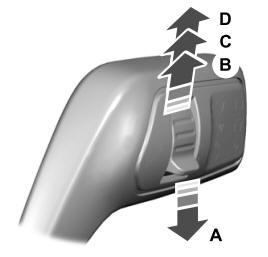
A - Single wipe.

Copyright © 2026 www.foexplorer.com